 EN
EN


Manufacturing facilities depend heavily on automatic packing machine systems to maintain production efficiency and meet delivery deadlines. When an automatic packing machine encounters problems, it can halt entire production lines, leading to significant financial losses and customer dissatisfaction. Understanding the most common issues that plague automatic packing machine operations and knowing how to resolve them quickly is essential for plant managers, maintenance teams, and production supervisors. This guide explores the typical failures affecting automatic packing machine performance and provides actionable solutions to get your equipment back online.
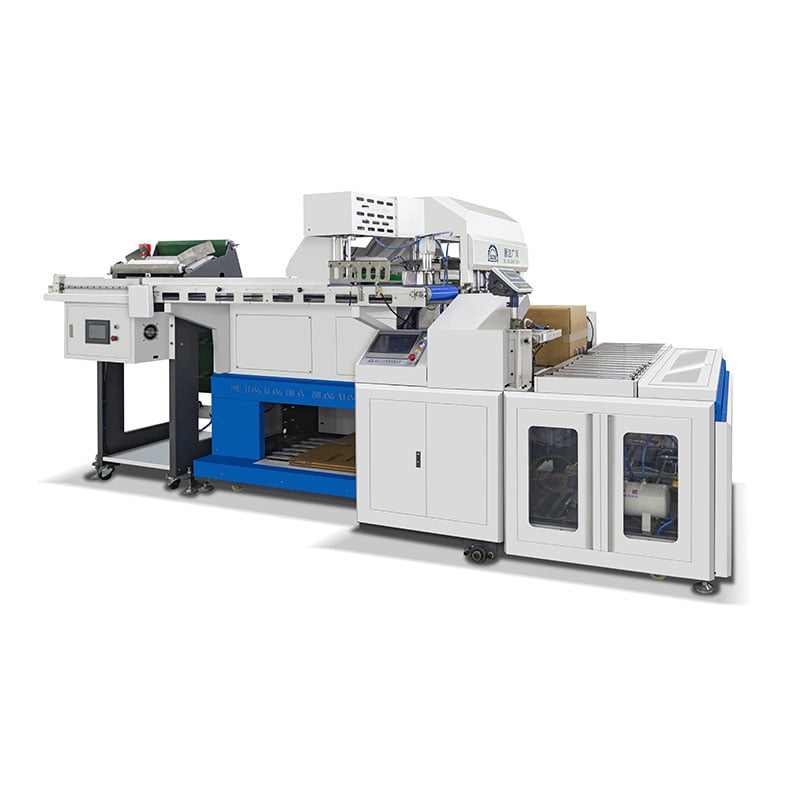
An automatic packing machine represents a significant capital investment, and any breakdown directly impacts operational margins. The good news is that most issues affecting automatic packing machine systems follow predictable patterns and respond well to systematic troubleshooting. By learning to identify and address these problems proactively, your facility can dramatically reduce unplanned downtime and extend the service life of your automatic packing machine equipment.
Mechanical Misalignment and Sensor Issues
Detecting Misalignment in Automatic Packing Machines
One of the most prevalent problems with any automatic packing machine involves mechanical misalignment between critical components. When the conveyor belt, carton former, or product infeed system drifts out of alignment, the automatic packing machine struggles to position items correctly for sealing and boxing. Operators typically notice that products jam in the feed chute, boxes shift during closure, or the automatic packing machine produces reject signals. Addressing automatic packing machine misalignment begins with a visual inspection of all moving parts and reference marks.
Sensor malfunctions compound misalignment challenges. Every automatic packing machine relies on optical, proximity, or pressure sensors to detect product presence, verify box positioning, and confirm seal quality. When these sensors accumulate dust, become misaligned, or develop electronic drift, the automatic packing machine either rejects good products or fails to catch defects. Most sensor-related faults with an automatic packing machine can be resolved by cleaning optical lenses with appropriate solvents and recalibrating sensor thresholds according to the equipment manual.
Fixing Automatic Packing Machine Alignment Problems
Correcting an automatic packing machine that has shifted out of alignment requires precision and patience. Begin by turning off power and engaging all safety locks before attempting any adjustment to your automatic packing machine. Use a laser alignment tool or machinist's straight edge to verify whether the conveyor centerline matches the infeed chute opening. Most modern automatic packing machine models include adjustment bolts on the support frame that allow fine-tuning without removing major components. After making adjustments to the automatic packing machine, run a diagnostic cycle through the control panel while observing product flow with no items present.
Sensor recalibration on an automatic packing machine often solves false-reject problems faster than mechanical fixes. Access the sensor settings through the automatic packing machine's touchscreen interface, then follow the calibration wizard provided by the manufacturer. During this process, the automatic packing machine learns the precise threshold values for your specific product type and box dimensions. Testing the recalibrated automatic packing machine with actual products before resuming full production ensures the sensor adjustments have resolved the underlying issue without introducing new errors.
Seal Quality Deterioration and Tape Feed Failures
Diagnosing Seal and Sealing Tape Problems
Automatic packing machine operators frequently encounter seal quality issues that only become apparent after boxes leave the production line. Poor adhesion between tape and carton, incomplete seals along box edges, and brittle or delaminating tape all indicate problems within the sealing subsystem of your automatic packing machine. These failures with an automatic packing machine typically stem from worn pressure rollers, dried-out tape adhesive, contaminated box surfaces, or incorrect tension in the tape feed mechanism. When quality rejects spike without any obvious jamming, the automatic packing machine likely has a sealing issue that requires investigation.
The tape feed mechanism itself represents a common failure point in any automatic packing machine. Dried or crystallized adhesive can prevent the tape from advancing smoothly, causing the automatic packing machine to produce short or skipped seals. Conversely, excess moisture can soften the tape too much, making it difficult for the automatic packing machine to maintain consistent tension. Inspecting the tape cartridge environment and monitoring humidity levels around your automatic packing machine helps prevent tape-related failures before they disrupt production.
Resolving Seal Quality Issues on Your Automatic Packing Machine
Fixing seal quality problems on an automatic packing machine begins with cleaning the pressure rollers and tape path. Use the cleaning procedures specified for your particular automatic packing machine model, typically involving lint-free cloths and approved solvents that do not damage roller coatings. After cleaning, check the roller pressure adjustment on your automatic packing machine and verify it matches the specification for your current box board thickness. Many automatic packing machine units include a simple pressure gauge or indicator that shows when adjustment is needed.
Replacing tape supplies on schedule prevents automatic packing machine failures caused by aged adhesive. Most manufacturers recommend replacing the tape cartridge when a certain percentage of the supply remains to ensure the automatic packing machine always has fresh, properly formulated tape available. If the automatic packing machine operates in an environment with extreme temperature swings, consider using specialty tape formulations designed for those conditions. Testing several seal samples after tape replacement confirms that the new supply has resolved any adhesion issues your automatic packing machine was experiencing.
Control System Errors and Emergency Stop Activation
Understanding Control System Faults
Modern automatic packing machine systems incorporate sophisticated programmable logic controllers and touchscreen interfaces that manage hundreds of sensors and actuators. When the automatic packing machine control system detects an out-of-range signal or logic error, it typically triggers an emergency stop and locks the machine until the issue is manually cleared. Common control system faults affecting an automatic packing machine include communication errors between modules, corrupted calibration data, outdated firmware, and cyclic error conditions that repeat on every cycle. Troubleshooting these problems requires understanding the automatic packing machine error code system and performing systematic diagnostics.
The emergency stop system on an automatic packing machine serves a critical safety function but also causes production interruptions if it activates accidentally. Stray electrical noise, worn e-stop button contacts, or loose wiring connections can cause the automatic packing machine to trigger emergency stops at unpredictable intervals. Identifying the root cause demands careful inspection of all wiring, connection points, and the physical condition of the emergency stop hardware on your automatic packing machine.
Resolving Control System Problems on Your Automatic Packing Machine
When the automatic packing machine displays an error code, begin by documenting the exact code and checking your system manual for the specific meaning. Most modern automatic packing machine documentation provides a troubleshooting tree for each error code, guiding technicians through step-by-step diagnostics. The automatic packing machine control system often includes a diagnostic mode that allows you to test individual sensors and actuators without running the production cycle, making it easier to isolate which component is causing the automatic packing machine to fault.
Firmware updates can resolve many intermittent issues with an automatic packing machine that persist despite mechanical repairs. Contact your equipment manufacturer to determine whether a newer firmware version addresses the specific errors your automatic packing machine has been encountering. Before updating, back up all custom recipes and configuration settings on your automatic packing machine to prevent losing production setup data. Testing the automatic packing machine thoroughly after any firmware update ensures the new version has not introduced unintended behavior changes.
FAQ
What is the most common problem affecting an automatic packing machine?
Sensor misalignment and contamination represent the most frequently encountered problems with automatic packing machine systems across manufacturing facilities. When optical or proximity sensors accumulate dust or shift slightly out of position, the automatic packing machine either rejects good products or fails to catch defects, causing immediate production disruptions. Regular cleaning and quarterly sensor recalibration can prevent most sensor-related failures in an automatic packing machine before they impact production.
How often should maintenance occur on an automatic packing machine?
A well-maintained automatic packing machine requires daily visual inspections for obvious damage or blockages, weekly cleaning of sensors and tape paths, and monthly detailed inspections of all mechanical components according to the manufacturer's schedule. More intensive maintenance on your automatic packing machine should occur every 6 to 12 months depending on production volume and operating environment. Preventive maintenance reduces unexpected automatic packing machine downtime by 40 to 60 percent compared to reactive troubleshooting approaches.
When should I call the manufacturer for help with my automatic packing machine?
Contact the automatic packing machine manufacturer whenever your facility has attempted standard troubleshooting steps without resolving the issue, when error codes do not match any entry in your manual, or when the automatic packing machine exhibits unusual sounds or movements that suggest internal damage. Additionally, if your automatic packing machine experiences intermittent faults that appear randomly, the manufacturer's technical support team can often identify underlying electrical or firmware issues that local troubleshooting cannot address. Having access to remote diagnostics through the automatic packing machine's network connection can speed up problem resolution significantly.